HeartPlus
Every heart and motion signal your watch exposes, and a personal blood pressure trend.
Get it on the Connect IQ Store
What it does
HeartPlus shows, live on the watch, every heart and motion signal a Connect IQ app is allowed to read, and adds an experimental blood pressure trend that you calibrate yourself with your own cuff.
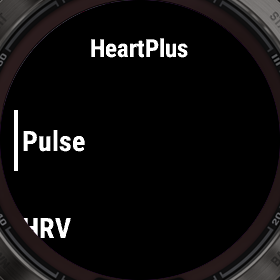
Open a page from the main list. UP / DOWN moves between pages, SELECT is the page's own action, MENU (hold UP) opens Actions, BACK returns to the list.
Not a medical device
The blood pressure figure is an estimate for wellness trends only. It is not a measurement, it is not validated for diagnosis or treatment, and it must never replace a cuff or a doctor's advice.
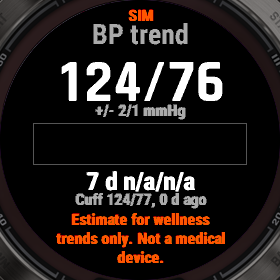
It is shown only after at least 20 cuff readings, only while the current readings stay inside the range you calibrated (otherwise the page says Out of calibrated range), and the calibration is marked STALE after 30 days. The footer Estimate for wellness trends only. Not a medical device. is always on the page.
What a watch app can and cannot see
Connect IQ does not give apps the raw optical (PPG) pulse waveform or the ECG signal: both stay inside the watch's sensor processor. No app can read them, and HeartPlus does not try.
What it uses instead: heart rate, beat-to-beat (RR) intervals, the accelerometer (up to 100 Hz), the gyroscope and the magnetometer, SpO2 when switched on, pressure, altitude, temperature, and the watch's history of heart rate, SpO2, stress and Body Battery. A value the watch does not provide is shown as n/a.
The pages
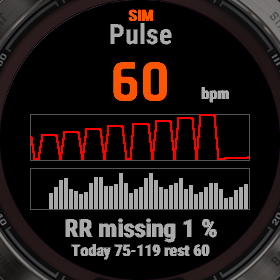
Pulse: current heart rate, a 60-second chart, one bar per heartbeat, Signal lost when no beat arrives for 3 seconds, and the share of the last minute not covered by beat intervals.
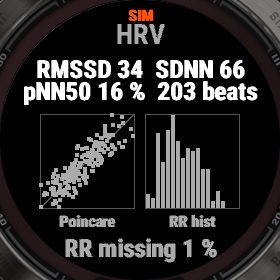
HRV: RMSSD, SDNN and pNN50 over a rolling 60-second window, a Poincare plot (each interval against the next) and a histogram of the intervals. Sixty seconds is short for HRV: these are live figures to watch move, not a reading to compare with a chest strap.
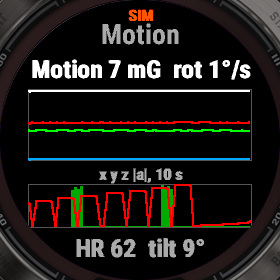
Motion: the raw accelerometer axes and their magnitude over 10 seconds, the motion score (how much the wrist moves, 0 when still), the gyroscope rotation rate, and the last minute of motion with heart rate on the same time axis.
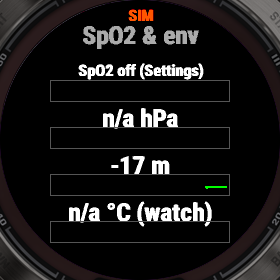
SpO2 & env: SpO2 (switch it on in Settings: it costs battery), pressure, altitude and temperature, each with 15 minutes of chart. The temperature is the watch's own sensor, between skin and air.
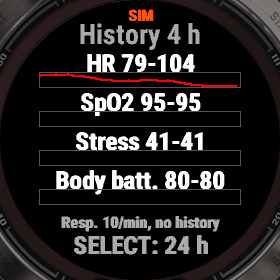
History: 4 or 24 hours (SELECT switches) of heart rate, SpO2, stress and Body Battery from the watch's history.
BP trend: the estimate with its band, a 24-hour chart, the 7-day baseline, the trend, and the last cuff reading. SELECT estimates again now.
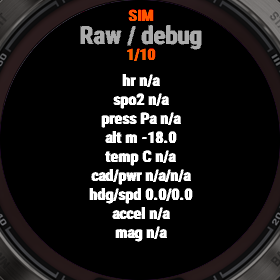
Raw / debug: every raw sensor value, the sample rates actually delivered, the feature vector and the model's weights. It is at the bottom of Settings, not in the page list; UP, DOWN and SELECT step through the sections.
Settings and alarms
Settings is at the bottom of the page list. Keep light on holds the backlight on while the app is open.
Alarms: High HR and Low HR sound when the heart rate stays past the threshold for 5 seconds, Signal lost after 10 seconds without a heart rate. An alarm vibrates, plays a tone if Alarm sound is on, and stays quiet for a minute after. They only work while HeartPlus is open: they are wellness alarms, not a medical monitor.
Calibrating the trend
Sit still for a few minutes, measure with your own upper-arm cuff, then open Actions > Log cuff reading and enter Systolic and Diastolic. The watch saves the reading together with what it measured at that moment; it warns if your wrist was moving.
After 20 readings the watch fits your personal model (ridge regression). Readings spread over about two weeks and different times of day give a better model than 20 in one evening. Actions > Calibration shows the count, the dates, the spread of your values and the model's error.
The band shown with the estimate is that error: the typical gap between the model and your cuff on readings it was not fitted on.
External Bluetooth sensors (experimental)
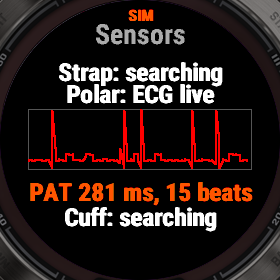
Switch each on in Settings > External sensors; each is off until then, because searching costs battery. The Sensors page shows what is connected. Pairing does not survive closing the app: HeartPlus searches again each time it opens and takes the first matching sensor it hears.
Heart rate strap: any strap with the standard Bluetooth heart rate service (Polar H10, Garmin HRM, Wahoo TICKR and others). Its beat-to-beat intervals replace the watch's, which arrive patchily, so HRV and the blood pressure features see every beat.
Polar ECG / optical: the raw ECG of a Polar H10 (130 samples a second) or the raw optical pulse of a Polar Verity Sense or OH1, drawn on the Sensors page. With an H10 and a Verity Sense together, HeartPlus measures pulse arrival time: the delay from the heart's electrical beat to the pulse reaching the arm. It is the best-studied signal for cuffless blood pressure, and it joins the model as one more feature, calibrated like the others against your cuff.
Bluetooth BP cuff: an upper-arm cuff with the standard Bluetooth blood pressure service. Keep HeartPlus open while you measure; the reading the cuff sends is logged as a calibration reading, exactly as if typed in Log cuff reading.
These have been written from the Bluetooth and Polar specifications and tested on recorded byte sequences, not yet with every sensor. Tell us what works with yours.
Recording and the computer tool
Actions > Start recording saves a FIT activity to Garmin Connect: heart rate, beat intervals, motion, SpO2 and the estimate every second, and each cuff reading as a lap with the values the model uses.
The free Python tool tools/fit_bp_model.py in the source repository fits the same model from those files on a computer and prints the coefficients to paste into the phone settings (External model).
Data and permissions
Sensors and sensor history: the live and recorded values on the pages. User profile: resting heart rate, heart rate zones and your wake time. FIT: recording activities. Bluetooth: only the external sensors you switch on.
Cuff readings and the model stay on the watch. Recordings go to your Garmin account like any activity. Nothing is sent anywhere else.
Screenshots
Taken in the Connect IQ simulator on a fenix 7X Pro, with simulated data (marked SIM).
Phone settings
In Garmin Connect or the Connect IQ app, under the app's settings. The same settings are in Settings on the watch.
| Setting | Values | Default |
|---|---|---|
| Keep light on | On / Off | Off |
| High heart rate alarm, bpm | Off, 100, 110, 120, 130, 140, 150, 160, 170, 180 | Off |
| Low heart rate alarm, bpm | Off, 40, 45, 50, 55, 60 | Off |
| Signal lost | On / Off | Off |
| Alarm sound | On / Off | On |
| Heart rate strap | On / Off | Off |
| Polar ECG / optical | On / Off | Off |
| Bluetooth BP cuff | On / Off | Off |
| SpO2 | On / Off | Off |
| Ridge lambda | 1, 2, 5, 10, 20, 50 | 5 |
| Motion warning | 30 mG, 60 mG, 100 mG, 150 mG | 60 mG |
| External model | On / Off | Off |
| External systolic: intercept, then 19 weights | text | (empty) |
| External diastolic: intercept, then 19 weights | text | (empty) |
| External feature means (19) | text | (empty) |
| External feature std devs (19) | text | (empty) |
| External feature minimums (19) | text | (empty) |
| External feature maximums (19) | text | (empty) |
| External systolic error, mmHg | 0 to 50 | 0 |
| External diastolic error, mmHg | 0 to 50 | 0 |
Watches 1
The watches HeartPlus is built for.
- fēnix 7X Pro