LNSMorse
Morse code on the wrist: screen flash, LED flashlight, sound and vibration, together and in step.
What it does
LNSMorse plays text as Morse code on a Garmin watch. Pick a message from the list, press START, and the watch sends it on up to four channels at once: the whole screen fills with a color for each dot and dash, the LED flashlight follows on watches that have one, the speaker beeps and the watch vibrates. Each channel can be switched off.
It ships with 26 ready-made messages in five languages, keeps up to 50 of your own, and can also go the other way: key Morse on the watch to send it, to transcribe it into text, or to practise reading it.
The app asks for no permission and collects no data.
Using it
Main screen: the message list. START plays the selected message. The second line of a row shows the beginning of its Morse, or the text when the message has a name of its own.
Play screen: any key or tap stops; START or a tap plays again; BACK returns to the list. DOWN switches looping on or off instead of stopping (off lets the pass being sent finish) and remembers the choice for that message.
Options is the last row of the list: press UP from the first message. Send by tap, Transcribe and Practice are the rows just above it. Rows that do not apply to a watch (LED settings on a watch without a flashlight, colors on a black-and-white screen) are not shown.
Timing
The standard (ITU) proportions are the defaults: a dot lasts 1 unit, a dash 3, the gap inside a letter 1, between letters 3 and between words 7. The unit is the dot length, 50 to 400 ms; the speed in words per minute is 1200 divided by it (100 ms = 12 WPM).
Dash length and both gaps can be changed in Options > Timing, counted in dots. A longer letter and word gap with fast characters (Farnsworth style) is a common way to learn.
Your own messages
Up to 50 messages of 200 characters. On the watch, Options > Messages > Add message (native keyboard, or a letter wheel on watches without one) and, for each message: Edit text, Rename, Loop (Default (Options) / On / Off), Move up, Move down, Delete. Your messages come first in the list, before the ready-made ones.
Message language decides which set of ready-made messages a first start installs and which one Restore default presets puts back: the watch language, or a fixed one. It never touches your own messages.
Settings on the phone
In Garmin Connect (or the Connect IQ app), the app's settings page has every option of the watch menu, then 16 Message slots. Each slot has a name (optional), a text of up to 200 characters, a loop choice and a Position: 1 puts that message first on the watch, 2 second, and so on; 0 leaves it after the numbered ones, in slot order. A slot with an empty text is unused.
Whenever that page changes, its messages go to the top of the watch list in that order, and a message removed there is removed from the watch. While the page is unchanged, an order or a deletion chosen on the watch stays. The watch never writes back to the slots.
The settings page exists only for an app installed from the Connect IQ store; a sideloaded copy has none. If the page shows an Add item button, the phone is showing the old 0.1.2 page, which cannot save messages: update the app, and if the button stays, delete the app from the watch and reinstall it from the store.
Send by tap, Transcribe, Practice
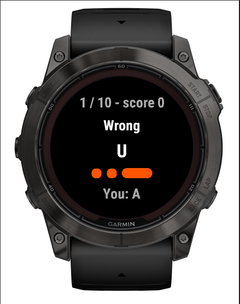
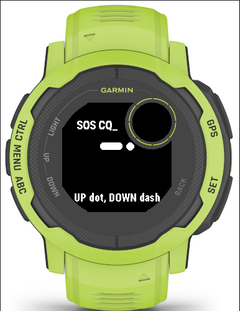
Send by tap: key Morse and the watch transmits it as clean, evenly timed dots and dashes on the chosen channels, for someone else to read. Transcribe is silent and turns Morse you key along with (heard or seen elsewhere) into text you can save as a message. Practice plays random letters, numbers or groups; you key them back and it keeps score.
Input (Options > Tap & practice): Touch left/right (left half dot, right half dash), Touch tap/hold, Buttons UP/DOWN, Straight key (START) (hold START as long as the element). Automatic picks left/right on touch watches and the buttons otherwise. Dot and dash can be swapped; letter and word breaks come from your pauses, and the watch adapts to your pace.
BACK erases the last letter, and leaves when there is nothing to erase. START (MENU or a left swipe with the straight key, where START is the key) opens the actions: Save as message, Clear, Leave; in Practice it checks the answer, or replays the item when nothing is entered.
Not available on the Instinct 2 / 2S / 2X / Crossover and Descent G1: their 96 KB of app memory is too small.
Touch limitations
Connect IQ tells an app about a tap only when the finger is lifted, never the moment it touches the screen, so a watch app cannot measure how long the screen is pressed. With Touch left/right, dot or dash is chosen by where you tap. With Touch tap/hold, a dash registers when the watch decides the touch is a hold, after its own fixed delay, so dashes cannot be faster than that.
Only the buttons report real press timing, which is why the straight key uses START. Watches without a touch screen use the buttons.
Sound, vibration and light
Each channel depends on the watch: sound needs a speaker, the LED a flashlight (fenix 7 Pro / 7X, epix Pro, Enduro 3, Instinct 2X, ...), and LED colors are limited to white, red and green where the watch has them. If the watch's own tones or vibration are switched off in its system settings, the app follows them and says so on the play screen.
Screen brightness during playback can be set from 25 % to 100 %, or left to the watch (System). On AMOLED watches the watch itself may dim a screen held bright for about a minute.
Screens
Captured in the Connect IQ simulator. Menus follow the watch language.
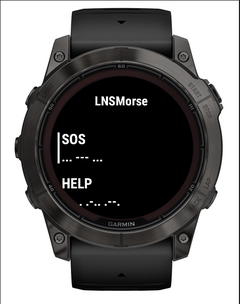
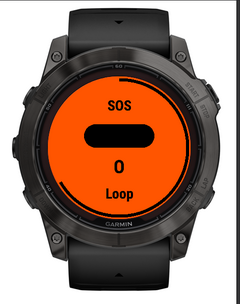
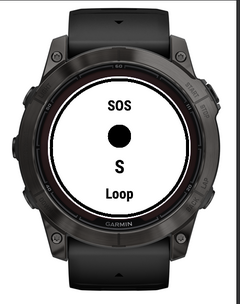
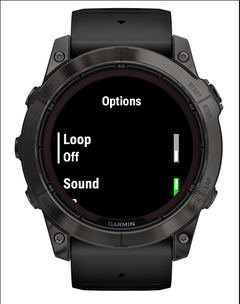
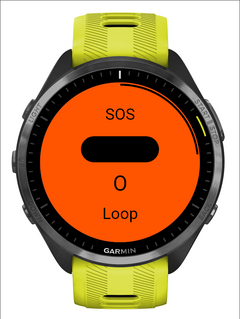
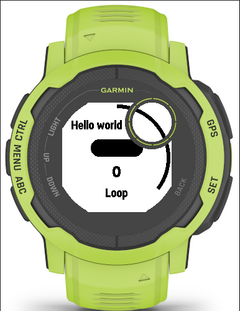
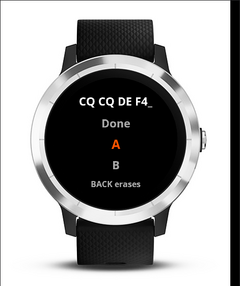
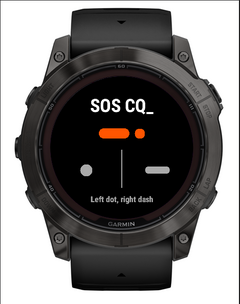
All settings
Every setting is both in the watch's Options menu and on the phone's settings page, under the names below.
| Setting | Values | Default |
|---|---|---|
| Loop | On / Off | Off |
| Sound | On / Off | On |
| Vibration | On / Off | On |
| Light | On / Off | On |
| Dot color | White, Red, Green, Blue, Yellow, Cyan, Magenta, Orange | White |
| Dash color | White, Red, Green, Blue, Yellow, Cyan, Magenta, Orange | Orange |
| Screen brightness | System, 25 %, 50 %, 75 %, 100 % | 100 % |
| Light source | Screen, LED, Screen + LED | Screen |
| LED brightness | Low, Medium, High | High |
| Dot length (ms) | 50 to 400 | 100 |
| Dash length (dots) | 2 to 5 | 3 |
| Letter gap (dots) | 2 to 6 | 3 |
| Word gap (dots) | 6 to 14 | 7 |
| Message language | Watch language, English, Français, Español, Deutsch, Italiano | Watch language |
| Tone pitch | 600 Hz, 800 Hz, 1000 Hz, 1500 Hz, 2000 Hz, 2500 Hz, 3000 Hz | 2000 Hz |
| Vibration strength | Low, Medium, High | High |
| LED color | White, Red, Green | White |
| Tap input | Automatic, Touch left/right, Touch tap/hold, Buttons UP/DOWN, Straight key (START) | Automatic |
| Swap dot and dash | On / Off | Off |
| Letter pause | Short, Normal, Long | Normal |
| Tick on each tap | On / Off | On |
| Practice characters | Letters, Numbers, Letters and numbers, All characters | Letters |
| Group size | 1 to 5 | 1 |
| Rounds | 5, 10, 20 | 10 |
Phone only: 16 message slots, each with these fields
Leave the text empty to remove this message from the watch. The name is optional. Position sets the order on the watch. 1 = first in the list. 0 = after the numbered ones, in slot order.
| Setting | Values | Default |
|---|---|---|
| Name | text, up to 30 characters | empty |
| Text | text, up to 200 characters | empty |
| Loop | Default (Options), On, Off | Default (Options) |
| Position | 0 to 16 | 0 |
Ready-made messages 26
The 26 messages installed in English. The French, Spanish, German and Italian sets are chosen with Message language.
| Name | Morse |
|---|---|
| SOS | ... --- ... |
| HELP | .... . .-.. .--. |
| INJURED | .. -. .--- ..- .-. . -.. |
| DANGER | -.. .- -. --. . .-. |
| I AM LOST | .. / .- -- / .-.. --- ... - |
| NEED WATER | -. . . -.. / .-- .- - . .-. |
| ALL OK | .- .-.. .-.. / --- -.- |
| YES | -.-- . ... |
| NO | -. --- |
| WAIT | .-- .- .. - |
| COME HERE | -.-. --- -- . / .... . .-. . |
| ON MY WAY | --- -. / -- -.-- / .-- .- -.-- |
| CALL ME | -.-. .- .-.. .-.. / -- . |
| HELLO | .... . .-.. .-.. --- |
| GOODBYE | --. --- --- -.. -... -.-- . |
| THANK YOU | - .... .- -. -.- / -.-- --- ..- |
| GOOD NIGHT | --. --- --- -.. / -. .. --. .... - |
| I LOVE YOU | .. / .-.. --- ...- . / -.-- --- ..- |
| CQ (calling anyone) CQ CQ CQ | -.-. --.- / -.-. --.- / -.-. --.- |
| 73 (best regards) 73 | --... ...-- |
| 88 (love and kisses) 88 | ---.. ---.. |
| Test (PARIS) PARIS PARIS | .--. .- .-. .. ... / .--. .- .-. .. ... |
| Alphabet ABCDEFGHIJKLMNOPQRSTUVWXYZ | .- -... -.-. -.. . ..-. --. .... .. .--- -.- .-.. -- -. --- .--. --.- .-. ... - ..- ...- .-- -..- -.-- --.. |
| Numbers 0123456789 | ----- .---- ..--- ...-- ....- ..... -.... --... ---.. ----. |
| Pangram THE QUICK BROWN FOX JUMPS OVER THE LAZY DOG | - .... . / --.- ..- .. -.-. -.- / -... .-. --- .-- -. / ..-. --- -..- / .--- ..- -- .--. ... / --- ...- . .-. / - .... . / .-.. .- --.. -.-- / -.. --- --. |
| Punctuation . , ? ' ! / ( ) & : ; = + - _ " $ @ | .-.-.- / --..-- / ..--.. / .----. / -.-.-- / -..-. / -.--. / -.--.- / .-... / ---... / -.-.-. / -...- / .-.-. / -....- / ..--.- / .-..-. / ...-..- / .--.-. |
Morse code table
Every character the app can send. Characters it cannot send are skipped; lower case is sent as upper case.
Letters
- A
.-- B
-...- C
-.-.- D
-..- E
.- F
..-.- G
--.- H
....- I
..- J
.---- K
-.-- L
.-..- M
--- N
-.- O
---- P
.--.- Q
--.-- R
.-.- S
...- T
-- U
..-- V
...-- W
.--- X
-..-- Y
-.--- Z
--..
Digits
- 0
------ 1
.----- 2
..---- 3
...--- 4
....-- 5
.....- 6
-....- 7
--...- 8
---..- 9
----.
Punctuation
- .
.-.-.-- ,
--..--- ?
..--..- '
.----.- !
-.-.--- /
-..-.- (
-.--.- )
-.--.-- &
.-...- :
---...- ;
-.-.-.- =
-...-- +
.-.-.- -
-....-- _
..--.-- "
.-..-.- $
...-..-- @
.--.-.- ’
.----.- ×
-..-
Accented letters (international extensions)
- À
.--.-- Ä
.-.-- Å
.--.-- Æ
.-.-- Ç
-.-..- È
.-..-- É
..-..- Ñ
--.--- Ö
---.- Ø
---.- Ü
..--
Sent as their base letter
Á = A,  = A, à = A, Ê = E, Ë = E, Ì = I, Í = I, Î = I, Ï = I, Ò = O, Ó = O, Ô = O, Õ = O, Ù = U, Ú = U, Û = U, Ý = Y, ß = SS, Œ = OE, Ÿ = Y
Watches 127
Every Garmin watch running Connect IQ 3.1 or later. The app adapts to what each has: speaker, LED, touch screen, keyboard, black-and-white screen.
- Approach S50
- Approach S70 42mm
- Approach S70 47mm
- Captain Marvel
- D2 Air
- D2 Air X10
- D2 Delta
- D2 Delta PX
- D2 Delta S
- D2 Mach 1
- D2 Mach 2
- D2 Mach 2 Pro
- Darth Vader
- Descent G1 / G1 Solar *
- Descent G2
- Descent Mk1
- Descent Mk2 / Mk2i
- Descent Mk2 S
- Descent Mk3 43mm / Mk3i 43mm
- Descent Mk3i 51mm
- Enduro
- Enduro 3
- epix (Gen 2) / quatix 7 Sapphire
- epix Pro (Gen 2) 42mm
- epix Pro (Gen 2) 47mm / quatix 7 Pro
- epix Pro (Gen 2) 51mm / D2 Mach 1 Pro / tactix 7 – AMOLED Edition
- fēnix 5 / quatix 5
- fēnix 5 Plus
- fēnix 5S
- fēnix 5S Plus
- fēnix 5X / tactix Charlie
- fēnix 5X Plus
- fēnix 6 / 6 Solar / 6 Dual Power
- fēnix 6 Pro / 6 Sapphire / 6 Pro Solar / 6 Pro Dual Power / quatix 6
- fēnix 6S / 6S Solar / 6S Dual Power
- fēnix 6S Pro / 6S Sapphire / 6S Pro Solar / 6S Pro Dual Power
- fēnix 6X Pro / 6X Sapphire / 6X Pro Solar / tactix Delta Sapphire / Delta Solar / Delta Solar - Ballistics Edition / quatix 6X / 6X Solar / 6X Dual Power
- fēnix 7 / quatix 7
- fēnix 7 Pro
- fēnix 7 Pro - Solar Edition (no Wi-Fi)
- fēnix 7S
- fēnix 7S Pro
- fēnix 7X / tactix 7 / quatix 7X Solar / Enduro 2
- fēnix 7X Pro
- fēnix 7X Pro - Solar Edition (no Wi-Fi)
- fēnix 8 43mm
- fēnix 8 47mm / 51mm / tactix 8 47mm / 51mm / quatix 8 47mm / 51mm
- fēnix 8 Pro 47mm / 51mm / MicroLED / quatix 8 Pro 47mm / 51mm
- fēnix 8 Solar 47mm
- fēnix 8 Solar 51mm / tactix 8 Solar 51mm
- fēnix 9 43mm
- fēnix 9 47mm / 51mm
- fēnix 9 Pro 43mm
- fēnix 9 Pro 47mm
- fēnix 9 Pro 51mm
- fēnix 9 Pro Solar 47mm
- fēnix 9 Pro Solar 51mm
- fēnix Chronos
- fēnix E
- First Avenger
- Forerunner 165
- Forerunner 165 Music
- Forerunner 170
- Forerunner 170 Music
- Forerunner 245
- Forerunner 245 Music
- Forerunner 255
- Forerunner 255 Music
- Forerunner 255s
- Forerunner 255s Music
- Forerunner 265
- Forerunner 265s
- Forerunner 55
- Forerunner 570 42mm
- Forerunner 570 47mm
- Forerunner 645
- Forerunner 645 Music
- Forerunner 70
- Forerunner 745
- Forerunner 935
- Forerunner 945
- Forerunner 945 LTE
- Forerunner 955 / Solar
- Forerunner 965
- Forerunner 970
- Instinct 2 / Solar / Dual Power / dēzl Edition *
- Instinct 2S / Solar / Dual Power *
- Instinct 2X Solar *
- Instinct 3 AMOLED 45mm
- Instinct 3 AMOLED 50mm
- Instinct 3 Solar 45mm / 50mm
- Instinct Crossover *
- Instinct Crossover AMOLED
- Instinct E 40mm
- Instinct E 45mm
- MARQ (Gen 2) Athlete / Adventurer / Captain / Golfer / Carbon Edition / Commander - Carbon Edition
- MARQ (Gen 2) Aviator
- MARQ Adventurer
- MARQ Athlete
- MARQ Aviator
- MARQ Captain / MARQ Captain: American Magic Edition
- MARQ Commander
- MARQ Driver
- MARQ Expedition
- MARQ Golfer
- Rey
- Venu
- Venu 2
- Venu 2 Plus
- Venu 2S
- Venu 3
- Venu 3S
- Venu 4 41mm
- Venu 4 45mm / D2 Air X15
- Venu Mercedes-Benz Collection
- Venu Sq
- Venu Sq 2
- Venu Sq 2 Music
- Venu Sq. Music Edition
- Venu X1
- vívoactive 3
- vívoactive 3 Music
- vívoactive 3 Music LTE
- vívoactive 4
- vívoactive 4S
- vívoactive 5
- vívoactive 6
* without Send by tap, Transcribe and Practice (96 KB of app memory)