HOOK
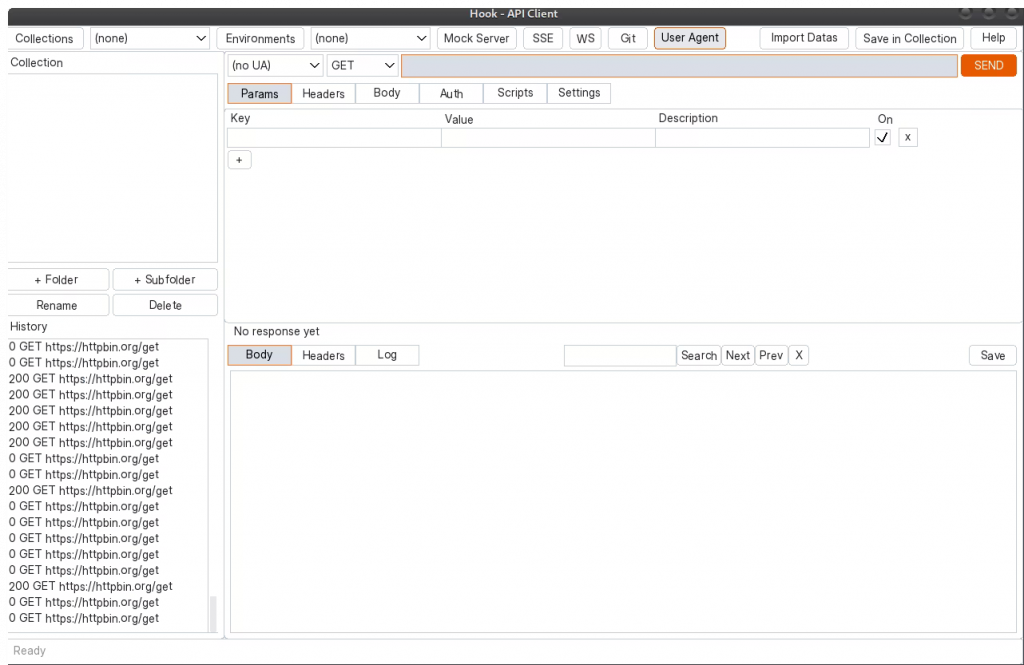
A graphical HTTP/HTTPS API client built on the Nilorea C Library.
Local-first. No cloud. No account. Git-native.
Click here to download windows installer
Click here to download .deb
Click here to download as appimage
Features
- Documentation
- HTTP/HTTPS request editor with method, URL, headers, params, body, auth
- Body types: none, raw, JSON, form-urlencoded, GraphQL, multipart (file upload)
- Auth types: none, bearer, basic, API key, OAuth2 client credentials, digest
- All auth fields support {{template}} variable expansion from environments
- Tabbed request editor: Params, Headers, Body, Auth, Scripts, Settings
- Tree-based collection editing in both the sidebar and the Collection
- popup: add / rename / delete folders at any depth, add / delete / replace
- requests
- Save in Collection popup: pick a folder destination (Save = append) or
- an existing request leaf (Replace = overwrite the slot in place), with
- in-memory folder management before commit
- Every destructive action (delete, replace, overwrite) surfaces a confirm
- dialog naming the specific target; rename collisions are refused
- case-insensitively with a statusbar message
- GraphQL editor: separate query, variables, and operation name fields
- Response viewer: status, elapsed time, body size, headers, pretty-printed JSON
- Response search: find text in body/headers/log with Next/Prev and wrap-around
- Save response body to file
- Response diff between two sequential responses
- Collection management: nested folders, requests, save/save as/load/delete as JSON
- All request settings serialized per-request in collections (auth, timeouts,
- redirects, retries, compression, user-agent, scripts, TLS, proxy)
- Environment variables with {{varname}} template expansion, delete with confirmation
- Template precedence: environment overrides collection base_url
- Collection runner with parallel execution (recursive through subfolders)
- Import from Postman Collection v2.1, Bruno .bru format, and Bruno OpenCollection YAML
- Bruno .bru and YAML directory import recurses into subdirectories
- Bulk import: directory of collection or environment JSON files
- curl command export and curl subprocess backend
- Follow redirects with configurable max redirects
- Connect timeout, request timeout, retry on failure/5xx
- Gzip/deflate compression (request + auto-decompress response)
- User-Agent presets: user-agents/ directory with JSON presets, toolbar selector
- Cookie jar: domain-aware cookie storage with Set-Cookie parsing
- WebSocket client popup: connect, send/receive messages, disconnect
- Server-Sent Events (SSE) streaming viewer
- Mock HTTP server with JSON route configuration
- JavaScript scripting engine (QuickJS ES2023) with hk.* API
- Pre-request, pre-auth, and post-request script hooks
- hk.test() and hk.expect() assertion framework
- Postman pm.* and Bruno bru.* script converter
- Git integration: status, stage, commit, log, diff, restore, branches, push, pull
- Git per-file: Stage, Unstage, Reset File, Reset Dir, Reset All with confirmation
- Git auto-stage and auto-commit on collection/environment save
- Git watches only: collections/, environments/, mock-routes/, scripts/, user-agents/
- Git remote: push/pull with token, basic, or SSH key authentication
- Git toolbar button color reflects status: green (clean), orange (dirty), blue (ahead), red (error)
- Git periodic pull check with configurable interval (0-180 min slider)
- Git behind-remote indicator in center statusbar
- Proxy: HTTP, HTTPS, and SOCKS5 proxy, CONNECT tunneling, no_proxy list, per-request override
- TLS: system CA auto-detection, custom CA files, skip-verify, client cert (mTLS)
- Windows CryptoAPI certificate store integration
- Activity log: in-app request/response/script event log with Log tab
- Activity log: Clear, AutoScroll, Save log to file
- Curl command and network errors (DNS, TLS) displayed in log
- Adaptive resize: windows and widgets scale proportionally on display resize
- Configuration persistence: hook.conf (JSON, auto-loaded/saved)
- History saves full request snapshot (all settings restored on click)
- CLI mode for headless automation and CI
Sketchr
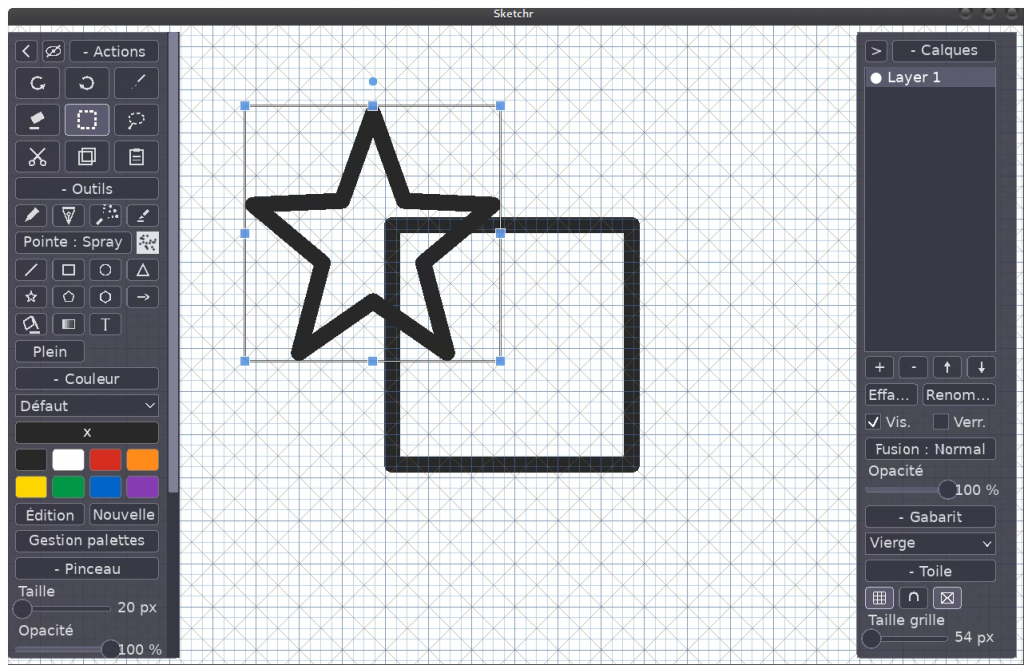
A cross-platform sketching / painting application written in C (C11) using
Allegro 5 and the nilorea-library. Inspired by the core experience of
Autodesk SketchBook: layers, brushes, pan/zoom/rotate canvas navigation,
a hideable UI and a triggerable grid overlay.
Try it online : click here
Download windows setup: click here
Download .deb linux packet: click here
Download as appimage: click here
Features
- Workspace canvas: a large square canvas (default 4096×4096, presets
16384..512 plus a custom size, clamped to the GPU limit) shown at 1:1 and
centered, so the drawing area fills the window at any aspect. Window
resizes keep the zoom/rotation and re-center. - Navigation: pan, zoom-about-cursor, and rotate (Ctrl+wheel on desktop,
two-finger pinch / rotate / pan on touch). Optional software palm rejection keeps a resting palm (a second contact during a stroke) from
hijacking the canvas. - Brushes: round, square, two chisels (left / right), flat, diamond and spray tips with size / hardness /
flow / per-stroke opacity, an eraser, and presets that pick their natural
tip (Pencil, Ink, Airbrush = particle spray, Marker = chisel), each with
its own icon and a live tip preview. Premultiplied-alpha pipeline with a
per-stroke accumulation buffer. Optional pressure-from-speed (slow strokes
press hard, fast strokes ease off; scales flow only). - Shapes: a straight-line tool (press / drag / release with a live
preview) plus rectangle, circle, triangle, star, pentagon, hexagon and
arrow – outline or filled – rendered
in the current color and placed as a movable / scalable / rotatable float,
right in the Tools fold. With grid snap on, placed shapes size to whole
grid cells and their center (and moves / resizes of any selection) pins to
the grid. - Text: type a multiline annotation, pick a bundled font (Sans / Serif /
Mono / Bold) and size, then place / scale / rotate it in the current color. - Templates: procedural drawing-helper guides drawn under the layers –
ruled paper, grids, dots, isometric, hexagon, one-point perspective,
day / weekly / monthly planners, to-do, calendar, storyboard, music sheet,
sketching guide and more – selected per document and optionally included in
the PNG export. - Symmetry: optional drawing symmetry that mirrors every brush dab live –
across the vertical axis (X), the horizontal axis (Y), both (XY), or a
radial fan – with an on-canvas guide overlay. Placed shapes and text bake
their symmetry copies at commit too. - Fill tools: flood fill (tolerance) and a linear gradient fill.
- Layers: add / delete / reorder / rename, per-layer opacity, visibility,
lock, and blend modes (normal / multiply / screen / add); each list row
carries a filled / open dot showing its visibility. Tile-based undo/redo. The
right panel is its own accordion – Layers (list + operations + clear +
rename), Template, and Canvas (grid / magnet-snap / diagonals / cell size) –
with persisted fold states. - Color: custom color palettes (built-in presets + user-defined,
persisted; rename / reset / remove behind one Manage popup) feeding an
8-swatch palette with a single selection
marker (a swatch or the custom-color chip); an R/G/B/A picker so a color
carries its own transparency (combined with the brush opacity on the layer);
the chip and picker preview show transparency over a checkerboard. - Grid + snapping: triggerable overlay with configurable spacing and a
dimmer minor lattice; optional snap. Snapped strokes draw as decided
straight segments (8-way, diagonals included) with a live preview line.
Diagonal hatching works on its own, with the main grid off; selections,
marquees and placed shapes snap too (half-step lattice for centers). - Persistence: native
.skrdocuments (layers, blend modes, lock,
template) with custom filenames – a system file chooser on desktop, an
in-app name popup + saved-sketch list on Android, browser download / file
picker on the web; Ctrl+S saves. Export to PNG with a Displayed-area or
Full-drawing crop, a configurable border, and an optional template. Android
writes to a public Documents/Sketchr folder that survives uninstall. - Touch-first toolbar: one uniform accordion – an Actions section of
finger-sized (40 px) icon buttons (undo / redo, brush / eraser / select,
cut / copy / paste) on top, then Tools (presets, tip, shapes, fill /
gradient / lasso / text), Color, Brush, Symmetry, File and Settings. The
collapse arrow and a crossed-eye Hide-UI button sit on the Actions header
row. Everything is iconified where a pictogram is clearer than a word
(procedurally drawn, theme-colored), with translated hover tooltips
explaining every icon. - Session persistence: every option set in a session – active tool, brush
settings and color, grid / snap / diagonals, symmetry, fold states, panel
width, export and text preferences, language – is saved on exit (and on
Android backgrounding) and restored at the next launch, plus the n_gui
window layout as JSON on desktop / web. - DPI-aware UI: on Android the toolbar, text and touch targets scale to
the screen density (read via JNI) so the interface stays readable on a
high-density phone without ballooning on a tablet; an Interface size
setting (Small / Normal / Large / Huge) nudges it per device. Desktop and
web keep the reference 1.0. - Settings: a Settings fold (pressure-from-speed, palm rejection,
language, interface size) that is auto-saved and reloaded on every
platform. - Four languages: English, French, Spanish and German cover the whole UI,
including the in-app help. A first-run popup asks for your language; the
Settings fold switches it live. Translations live in plain UTF-8lang/*.txtfiles (regenerated into the binary bygen_lang.py), so adding
or fixing a language needs no code change. - Hideable UI for a clean full-canvas view; Android runs fullscreen and
landscape. Both the toolbar and the layer panel collapse to a thin edge tab
(a</>button) to free up canvas space. Help and Exit buttons at
the bottom of the toolbar open a tabbed in-app reference (every tool, button,
shortcut and gesture) and a quit confirmation (handy on touch / web).