Portapack Mayhem V2.2.0

A new release of the famous Mayhem firmware for the HackRF + Portapack is out !

https://github.com/portapack-mayhem/mayhem-firmware/releases/tag/v2.2.0

We're excited to share the latest updates in v2.2.0:

New Applications & Utilities:
- App Manager: A new settings app to manage which applications are visible in the menu.
- Detector: A new wide-band signal detector with a graphical RSSI history to help you find nearby transmitters.
- GFX EQ: A beautiful graphical audio equalizer for the WFM radio.
- Hopper: A powerful frequency hopping utility. Load a list of frequencies and transmit across them in various patterns.
- Level: The popular Level meter is back as an external app.
- Scanner: The frequency scanner is now an external app with improved performance.
- SD Card Wipe: The utility to securely wipe your SD card is now an external app.
- Stopwatch: A handy stopwatch and timer utility.
- WAV Viewer: The WAV file viewer and analyzer is now an external app.
- Antenna Length: The whip antenna calculator is now an external app.
- Playlist Editor: A new utility to create and edit .PPL replay playlists directly on the PortaPack.
- Debug PMem: A new debug utility to dump the contents of the persistent memory to the SD card.

New Games:
- Snake
- Tetris
- Breakout
- Doom
- Blackjack
- Battleship (POCSAG-based multiplayer)
- Space Invaders
- Dino Game (Chrome's classic, now on your PortaPack!)

New Weather Satellite Decoders:
- WeFax Receiver: A dedicated app for receiving and decoding HF Weather Fax transmissions.
- NOAA APT Receiver: A dedicated app for receiving and decoding NOAA APT weather satellite images.

Enhancements & Improvements
- Analog Audio App:
New Demodulation Modes: Added AM-FM and WFM-AM modes specifically for decoding weather satellite transmissions (WeFax and NOAA APT).
Waterfall Zoom: Added a "ZOOM x2" feature in AM and AM-FM modes for a closer look at the spectrum.
Settings Saved: Your preferred AM mode and zoom factor are now saved and restored on startup.

- BLE RX App:
MAC Vendor Lookup: The app can now use the new MACADDRESS/macaddress.db file on your SD card to identify the manufacturer of BLE devices.
Improved Stability: Refactored to use the new asynchronous USB messaging system, improving stability and performance.
Better Channel Hopping: Channel hopping is now sequential (37-38-39) instead of random, ensuring more consistent discovery.
Accurate Power Reading: The reported dBm value now correctly accounts for LNA and VGA gain settings.
UI/UX: Improved error handling, keyboard entry modes, and list clearing.

- ADSB Receiver:
Enhanced Decoding: Now decodes more frame types (DF4, DF5, DF20, DF21) to extract Squawk codes, more accurate altitude, and callsigns.
True Airspeed (TAS): The app can now calculate and display True Airspeed (TAS) from Indicated Airspeed (IAS) and altitude data.
Improved Logging: Logs now include more detailed information like Squawk, SIL, and vertical rate.
Beep on Packet: Added an option to beep whenever a valid ADSB packet is received.

- Signal Generator (SigGen):
Major Overhaul: The SigGen app has been completely revamped with new modulation types, including BPSK, QPSK, DSB, AM (50% & 100% depth), and Pulsed CW. This makes it a much more versatile testing tool.
Improved UI: The user interface has been updated to logically group modulation and shape options.
File Manager:
Improved Navigation: The directory listing and pagination logic has been completely rewritten for a smoother and more intuitive experience.
Waterfall Gradient Installer: When you open a .txt file from the new WATERFALLS directory, you'll be prompted to install it as the new default waterfall color scheme.

- Capture App:
Your settings for capture rate, file format, and auto-trim are now saved and restored automatically.
UI & UX Improvements
Customizable Waterfall Colors: The Looking Glass and Search apps now use a customizable color gradient. Create your own waterfall.txt file in the WATERFALLS directory on your SD card to change the look!
New "Dark" Theme: A new theme has been added for those who prefer a darker interface.

- New Settings Menus:
Display: Control the new "Fake Brightness" feature and set your screen type (TFT vs. IPS).
Button Speed: Adjust the repeat delay, repeat speed, and long-press delay for the physical buttons.
Responsive UI: Many applications and widgets now dynamically adjust their layout to better fit different screen resolutions.
Improved Keyboard: The on-screen keyboard now defaults to the most logical mode (Alpha, Numeric) depending on the context.
New Icons: Added a huge number of new icons for all the new apps and features.

Under the Hood & For Developers
- External App Architecture: The firmware now supports loading and running applications from the SD card. This is a fundamental architectural shift that allows for greater flexibility and expansion.
- Build System: The minimum required CMake version has been updated to 3.16.
- Code Refactoring: Many internal apps have been moved to the new external app system, cleaning up the main firmware codebase. The de_bruijn.cpp generator has been removed in favor of more modern methods.

SD Card Content

New Directories:
- WATERFALLS/: Place your custom waterfall color gradient files here (e.g., aurora.txt, flame.txt).
- HOPPER/: Store your frequency lists for the new Hopper app here.
- MACADDRESS/: Place the macaddress.db file here for the BLE RX vendor lookup feature.
- SUBGHZ/: For Flipper-compatible .sub files.

New Files:
- Added example files for the new WATERFALLS and HOPPER directories.
- Added macaddress.db for BLE vendor lookup.
- Cleaned Up: Removed old and unused FREQMAN files.

Don't forget our various and usefull websites:

Mayhem HUB: https://hackrf.app/

Mayhem Main Repository: https://github.com/portapack-mayhem/mayhem-firmware

Mayhem Wiki: https://github.com/portapack-mayhem/mayhem-firmware/wiki

Mayhem User Provided Freqman Files: https://github.com/portapack-mayhem/mayhem-freqman-files

Mayhem MDK: https://github.com/portapack-mayhem/mayhem-mdk

Mayhem ESP32 Module: https://github.com/htotoo/ESP32-Portapack

Thanks to all the contributors on that release !!

#hackrf #portapack #mayhem

HackRF Portapack Mayhem 2.0.1

The new stable firmware is out, with a bunch of bugfixes, new features, and new apps !!
Here you go for a detailed changelog since 2.0.0 !
First apps changes are listed, and then the UI / Radio / Baseband / Website / GIT ones.

TLDR, main features for that update:

  • Freqman is supporting a lot more files than before
  • Tone beep has been added to a ton of apps and as a global setting too
  • 2 new apps which will make use of the incoming ESP32 USB tooling
  • Auto record and repeat in Recon
  • Autostart app on power on option
  • RX IQ CALibration
  • lots of fixes and cleanings
  • some new preset/freqman files
  • some new BLE options

List of updated apps:

ADSB:

  • Beep-on-packet support in ADSB RX app
  • Added sil value ASDB

AIS:

  • Beep-on-packet support in AIS app

Audio:

  • Adding Rx IQ error phase CAL to SPEC Audio_App
  • Added a beep duration parameter
  • Improved audio beep tone

BLE:

  • Added all and all-safe attack types to blespam
  • Bt namespam

Capture/Recording apps:

  • Record gps lat, lon, satinuse from recorder app if there was gps signal

Recon:

  • Fix Recon Modulation/Bandwidth presets
  • Recon repeat auto recorded file mode
  • Added enums for recon_config bits

ERT:

  • beep on packet

Freqman:

  • Add FPV analog frequenqies to FREQMAN
  • Update FPV_ANALOG.TXT
  • Limiting description size to 30, and minor fix
  • SSTV Freqs
  • Added and fixed freqs
  • Create RADIOS_FM_FR_PARIS.TXT with FM Radios in Paris
  • Adding Australian UHF channels and Brisbane Airband to FREQMAN

Fileman:

  • Support "clean" files
  • File manager "Clean" button tweaks
  • Darken FileMan button colors for visibility
  • Fileman memory opt
  • Allow to load more files but unordered
  • Continued folder names consolidation & GPS default folder
  • FileMan support for folder Cut & Paste and Timestamp Rename

Games:

  • Cheat code protect in pacman app

Fox hunt:

Level:

  • Added Rxsat in Level app
  • Level app: coloration of RxSat value
  • Level fix and beep, RSSI avg fix
  • Fixing level beep, bad copy paste on special SPEC mode
  • Fix gui glitch on beep squelch

Looking glass:

  • Looking glass beep
  • Added CubeSats to Presets
  • Adding Australian UHF to Looking Glass
  • Adjust GUI for more preset name room

Mic:

  • Mic audio ak4951 fix

POCSAG:

  • Beep-on-packet support in POCSAG app

RadioSonde:

  • Fixed Sonde RSSI "Beep"
  • Radiosonde beep tone tweaks
  • Radiosonde QR code fixes

Settings:

  • Autostart option
  • Fix Cancel button in Settings->Autostart
  • Beep-on-packets option in Settings

TPMS:

  • Beep-on-packet support in TPMS app

Wardrive Map:

Weather:

  • Beep-on-packet support in Weather app

Other updates:

Radio:

  • Set iq_phase_cal in radio when starting SPEC mode
  • Added RXIQCALC
  • Preserve radio mode when updating iq_tx_phase_cal

Tools/Debug:

  • Improved flash image validation
  • External sensor tester app
  • Lambda the flash util menu add item code
  • Audio Beep Test (Debug) external app
  • Improved Audio Beep Test
  • More debug Audio Beep Test tweaks
  • Show true M0 free heap space in DFU overlay
  • Commented out Debug -> Memory Usage app

Baseband:

  • Start audio DMA only in apps that use audio
  • Disabled unused baseband "no-op" process
  • Stop audio DMA in baseband::shutdown
  • Use freq from AppSettings unless passed from another app

USB/Serial:

  • Added crc32 command to usb shell
  • Dynamic usb buffer fill for screenframeshort

UI:

  • Optimized fake brightness code
  • Change sun bitmap to make it more like a sun
  • Remove unused text_info widget
  • Eliminate unnecessary NumberField to save code space
  • Deallocate menu buttons to save memory
  • Fix butngrid/capture and fix contributor name
  • Removed special font characters
  • Move the no ext app tile to forward
  • Modify warning text
  • Add GPS icon, fix overwrite bug

Code/Build:

  • Fix compiler warnings
  • Fix unused warnings
  • Fix build warning in settings
  • Declare all folder names in a single source file

Git depot:

  • Update bug_report.md
  • Create config.yml
  • Rename bug_report.md to 01_bug_report.yml
  • Update and rename feature_request.md to feature_request.yml
  • Rename feature_request.yml to 02_feature_request.yml
  • Update config.yml
  • Rename problem-upgrading-the-firmware.md to 03_problem-upgrading-the-firmware.md

Website (https://hackrf.app):

  • Fix shift back in screenshot and mayhem hub

Last notes:

If you are coming from a version <2.0.0, you have to first update using the classic hackrf_spiflash method to bring your firmware to a version >=2.0.0. It will only update the parts of the firmware on the flash, all external apps will NOT be updated using only hackrf_spiflash.

In a second time use the web interface at https://hackrf.app to update to lastest stable/nightly. It will ALSO update external apps that are stored on the sdcard.

If your firmware is already >= 2.0.0, just directly go to https://hackrf.app and update all in one go from there.

!! all sdcard content is NOT updated through website, only the external apps !!

Links:
https://github.com/portapack-mayhem/mayhem-firmware/releases
https://github.com/portapack-mayhem/mayhem-firmware/wiki/Update-firmware

#hackrf #portapack #mayhem #firmware #update

Portapack firmware with Search App and updated Freqman files (based on latest next )

  • I've build an up to date firmware with the last updates from next and the last version from search app and freqman enhancements.
  • The Search app is in the 'receive' menu
  • The documentation is here : https://github.com/GullCode/portapack-mayhem/wiki/Search
  • -Freqman now do understand freq files with that format:
    f=468000000 f=468000000,d=Single Freq f=468000000,m=AM,d=Single Freq AM f=468000000,m=NFM,d=Single Freq NFM f=468000000,m=WFM,d=Single Freq WFM f=468000000,m=AM,b=DSB,d=Single Freq AM DSB f=468000000,m=AM,b=USB,d=Single Freq AM USB f=468000000,m=AM,b=LSB,d=Single Freq AM LSB a=87000000,b=110000000 a=87000000,b=110000000,m=AM,s=100KHz,d=AM radio search a=87000000,b=110000000,m=AM,b=DSB,s=250KHz,d=AM radio search LSB a=87000000,b=110000000,m=WFM,b=16k,s=50KHz,d=WFM radio search s=50KHz r=430150000,t=430550000 r=430150000,t=430550000,d=HAM radio r=430150000,t=430550000,m=AM,b=DSB,d=HAM radio
  • The freqman GUI have note been improved and may show partial results on new formatted lines
  • Description of the fields:
    f=freq for one frequency or a=start_frequency,b=end_frequency for a range
    m=modulation
    b=bandwidth
    s=step
    d=description
  • All fields except 'f=freq' or 'a=freqA,b=freqB' are mandatory. If nothing specified actual value is used.
  • As a reminder :
    -Most of the time if the Search app is not working as you expected it's coming from a SDCARD problem.
    -You need a SDCARD for the Search app to save settings between runs and between settings menu / main gui, and you need a SEARCH folder at the root of it.
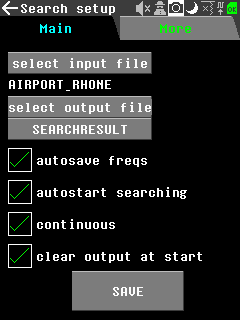
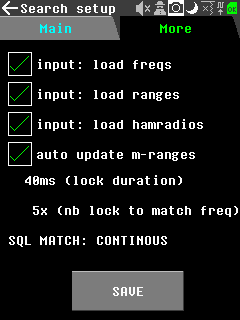
    -Don't forget to check that by default the 'input: load' fields in 'search app -> params -> more ' are all checked.
    -You HAVE to click save in ordre to save the settings.

portapack-h1_h2-mayhem.bin