grep: exclude grep from ps results

Tip: use a regexp so the grep is not matching the line where is sits in ps list:

ps -aef | grep "[m]atchingexp" will match anything starting with letter 'm' and followed by 'atchingexp' , which will not be in the ps list as it will contain the [] around the first letter of your match
grep: retain colors when piping

By default grep -coloris not producing color symbols if it detects that the output is not a terminal.

grep -color=auto is doing the same, that is not producing color symbols if it detects that the output is not a terminal.

The solution is to use ``grep -color=always`` in the place that need it.

Do not put it in an alias of grep as it would break some code somewhere else. Color symbols are strings like "ESC[35m" and they will be inserted in the text.

Recursive grep FTW

In case you're trying to search recursively for a specific file type and data mask, grep -r is not enough to bring the desired result.
You'll have to use --include 'type' and then, even if the directory does not contain any of the given filetype in root, it's still working.

Example;

grep -r --include '*.extension' 'Text to match' directory
grep -r --include '*.cpp' 'Audio' .

Portapack firmware with Search App and updated Freqman files (based on latest next )

  • I've build an up to date firmware with the last updates from next and the last version from search app and freqman enhancements.
  • The Search app is in the 'receive' menu
  • The documentation is here : https://github.com/GullCode/portapack-mayhem/wiki/Search
  • -Freqman now do understand freq files with that format:
    f=468000000 f=468000000,d=Single Freq f=468000000,m=AM,d=Single Freq AM f=468000000,m=NFM,d=Single Freq NFM f=468000000,m=WFM,d=Single Freq WFM f=468000000,m=AM,b=DSB,d=Single Freq AM DSB f=468000000,m=AM,b=USB,d=Single Freq AM USB f=468000000,m=AM,b=LSB,d=Single Freq AM LSB a=87000000,b=110000000 a=87000000,b=110000000,m=AM,s=100KHz,d=AM radio search a=87000000,b=110000000,m=AM,b=DSB,s=250KHz,d=AM radio search LSB a=87000000,b=110000000,m=WFM,b=16k,s=50KHz,d=WFM radio search s=50KHz r=430150000,t=430550000 r=430150000,t=430550000,d=HAM radio r=430150000,t=430550000,m=AM,b=DSB,d=HAM radio
  • The freqman GUI have note been improved and may show partial results on new formatted lines
  • Description of the fields:
    f=freq for one frequency or a=start_frequency,b=end_frequency for a range
    m=modulation
    b=bandwidth
    s=step
    d=description
  • All fields except 'f=freq' or 'a=freqA,b=freqB' are mandatory. If nothing specified actual value is used.
  • As a reminder :
    -Most of the time if the Search app is not working as you expected it's coming from a SDCARD problem.
    -You need a SDCARD for the Search app to save settings between runs and between settings menu / main gui, and you need a SEARCH folder at the root of it.
    -Don't forget to check that by default the 'input: load' fields in 'search app -> params -> more ' are all checked.
    -You HAVE to click save in ordre to save the settings.

portapack-h1_h2-mayhem.bin

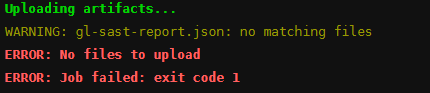
GitLab: WARNING: gl-sast-report.json: no matching files

When enabling SAST in a gitlab project you can have that kind of error at the tests part:

The yaml provided is not containing the needed part:

artifacts:
   name: sast
   paths:
     - gl-sast-report.json
   reports:
     sast: gl-sast-report.json
   when: always

Source:

https://forum.gitlab.com/t/uploading-artifacts-warning-gl-sast-report-json-no-matching-files-error-no-files-to-upload/60887/5

https://gitlab.com/gitlab-org/gitlab/-/issues/345696#note_737150614

Compare two json in shell

I did it using the JQ command line tool from https://stedolan.github.io/jq/

Exemple: list all json files from current directory and print the difference with updated jsons from updated/ directory

for user in  `ls updated-users`
do
    # print file name
    echo $user
    # simple 
    diff <(jq -S . users/$user) <(jq -S . updated-users/$user)
    # or full on one side and the diff on the other side
    # diff -y --left-column <(jq -S . users/$user) <(jq -S . updated-users/$user)
    # or full on one side and the diff on the other side, colored
    # diff -y --left-column --color  <(jq -S . users/$user) <(jq -S . updated-users/$user)
done

#shell #diff #json #script